
I worked for several years as an ASP .NET MVC developer and I still do even if I do less front-end development at the moment. During my professional life I came across a few tips for this technology that helped me making my code cleaner and less coupled.
Before creating this blog I owned another one in french where I posted a few articles related to Model validation for a form. I will expose the concept of these articles in this new blog post, in english this time. Maybe it will look obvious for you but I wish I knew these tips when I started working with ASP .NET MVC and this is why I’m creating this blog entry, it might help some of you.
The problem
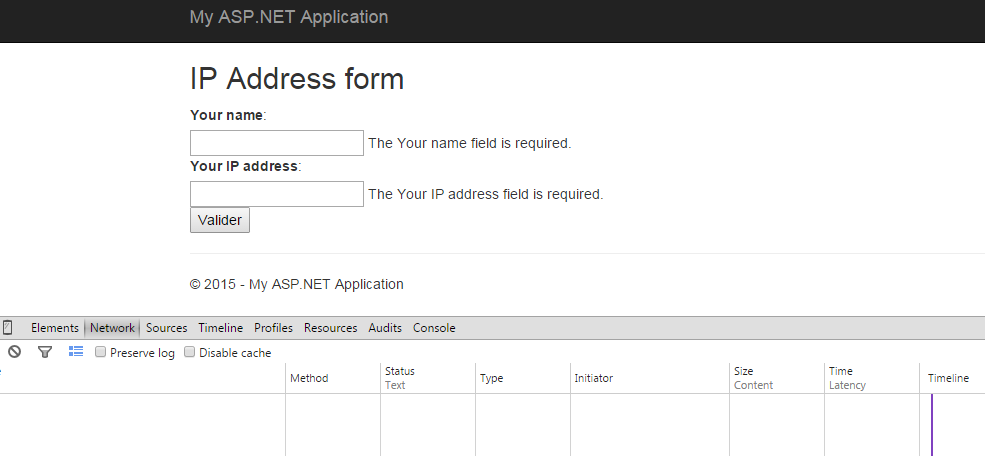
I created the following form for example, which ask for a name and an IP address:
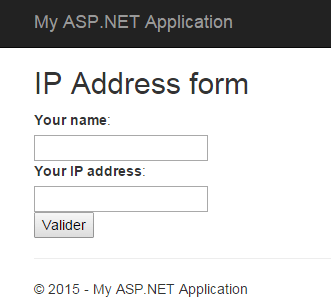
I created this form using a new empty MVC application in Visual Studio and here is the Index.cshtml view:
@model CodingTips.Web.Models.IPAddressModel

<h2>IP Address form</h2>
@using (Html.BeginForm())
{
    @Html.AntiForgeryToken()
    <div>
        @Html.LabelFor(m => Model.Name):
    </div>
    <div>
        @Html.TextBoxFor(m => Model.Name)
        @Html.ValidationMessageFor(m => Model.Name)
    </div>
    <div>
        @Html.LabelFor(m => Model.IPAddress):
    </div>
    <div>
        @Html.TextBoxFor(m => Model.IPAddress)
        @Html.ValidationMessageFor(m => Model.IPAddress)
    </div>
    <input type="submit" />
}
The Model and the Controller are defined the following way at the moment:
public class IPAddressModel
{
    [Required]
    [Display(Name = "Your name")]
    public string Name { get; set; }

    [Required]
    [Display(Name = "Your IP address")]
    public string IPAddress { get; set; }
}

public class HomeController : Controller
{
    [HttpGet]
    public ActionResult Index()
    {
        return View();
    }

    [HttpPost]
    [ValidateAntiForgeryToken]
    public ActionResult Index(IPAddressModel model)
    {
        if (!ModelState.IsValid)
        {
            return View(model);
        }

        return RedirectToAction("Validate");
    }

    [HttpGet]
    public string Validate()
    {
        return "Your IP address has been registered";
    }
}
As you can see I already put some validation logic that will only verify that the fields are not left empty. If the user fill the two text boxes he will be redirected to a page containing only a confirmation message, this is the final result.
But, as you probably guessed it, there are issues with this validation code, the IP address field can be filled with any string value and the Model will be valid. This is not what we desire, we want a more accurate validation for this field and this is what I will show in this article.
When I began working with ASP .NET MVC my first thought, when I encountered an issue like this one, was to add all the validation logic inside the POST action of the Controller. Well, it can work but this is not the place to do so, this option increase the code coupling especially when the Model to validate is huge. In my opinion the Controller should only take care of the “flow” logic of the application and the validation should be placed somewhere else.
The good news is that ASP .NET MVC has been designed to be extensible for Model validation in an easy way. Let’s see how this can be done.
IValidatableObject
It is possible to add validation at the class-level, directly on the Model itself by implementing a specific interface: IValidatableObject. There is only one method available in this interface, the Validate() method. It will be automatically called by the MVC framework when the ModelState.IsValid code is executed, which is already present in our Controller. Let’s see the new version of the Model:
public class IPAddressModel : IValidatableObject
{
    [Required]
    [Display(Name = "Your name")]
    public string Name { get; set; }

    [Required]
    [Display(Name = "Your IP address")]
    public string IPAddress { get; set; }

    public IEnumerable<ValidationResult> Validate(ValidationContext validationContext)
    {
        const string regexPattern = @"^([\d]{1,3}\.){3}[\d]{1,3}$";
        var regex = new Regex(regexPattern);

        if (!regex.IsMatch(IPAddress))
            yield return new ValidationResult("IP address format is invalid", new[] { "IPAddress" });
    }
}
In this first implementation of the Validate() method I simply check that the given address match an IP V4 format (xxx.xxx.xxx.xxx). I have nothing else to do before being able to test this new behavior in my form.
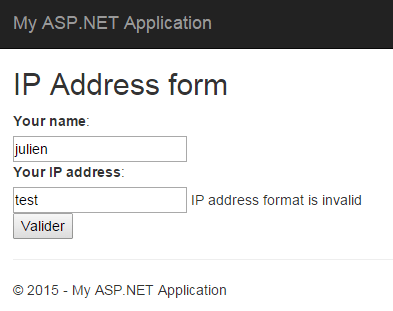
It works as expected. Yet, the validation is not over since I can put the value 800.800.800.800 (which is not valid for an IP address) without having any error, there is more validation to do:
public IEnumerable<ValidationResult> Validate(ValidationContext validationContext)
{
    const string regexPattern = @"^([\d]{1,3}\.){3}[\d]{1,3}$";
    var regex = new Regex(regexPattern);

    if (!regex.IsMatch(IPAddress))
        yield return new ValidationResult("IP address format is invalid", new[] { "IPAddress" });

    string[] values = IPAddress.Split(new[] { '.' }, StringSplitOptions.RemoveEmptyEntries);

    byte ipByteValue;
    foreach (string token in values)
    {
        if (!byte.TryParse(token, out ipByteValue))
            yield return new ValidationResult("IP address value is incorrect", new[] { "IPAddress" });
    }
}
I extended the Validate() method in order to add more logic and to check that each element of the IP address has a correct value. I did this by checking that each of them can be transformed into a byte (value from 0 to 255).
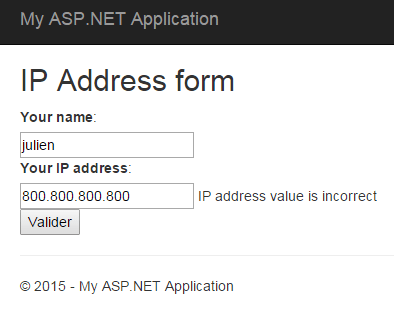
By using the IValidatableObject interface I was able to add validation logic to my Model without modifying my Controller. Doing so can be helpful when you have validation logic that depends on several properties of the Model.
In our example I used this interface only to check a single property and therefore it can look a bit “overpowered”. And if I have another form with a IP address field I will need to extract this part of the logic into a specific method to avoid code duplication. This point leads me to my next tip.
Custom attribute
To add validation to a specific field, the IP address one in our case, my advice will be to create a custom validation attribute. This will allow me to put the validation logic in one place only. Here’s the attribute implementation:
public class IpAddressAttribute : RegularExpressionAttribute
{
    public IpAddressAttribute()
        : base(@"^([\d]{1,3}\.){3}[\d]{1,3}$")
    {}

    public override bool IsValid(object value)
    {
        if (!base.IsValid(value))
            return false;

        string ipValue = value as string;
        if (IsIpAddressValid(ipValue))
            return true;

        return false;
    }

    private bool IsIpAddressValid(string ipAddress)
    {
        if (string.IsNullOrEmpty(ipAddress))
            return false;

        string[] values = ipAddress.Split(new[] { '.' }, StringSplitOptions.RemoveEmptyEntries);

        byte ipByteValue;
        foreach (string token in values)
        {
            if (!byte.TryParse(token, out ipByteValue))
                return false;
        }

        return true;
    }

    public override string FormatErrorMessage(string name)
    {
        return string.Format("The '{0}' field has an invalid format.", name);
    }
}
The logic is exactly the same as the one present in the IValidatableObject chapter. First checking the overall format with a regular expression and this is why I created a RegularExpressionAttribute subtype. Then the value of each byte is checked. Now I can use this attribute on my Model:
public class IPAddressModel
{
    [Required]
    [Display(Name = "Your name")]
    public string Name { get; set; }

    [IpAddress]
    [Required]
    [Display(Name = "Your IP address")]
    public string IPAddress { get; set; }
}
The Controller is unchanged, the Model is much cleaner and I can easily reuse my attribute for each IP address property in my application models without duplicating the logic.
My Model is now fully checked but only on the server-side, and this validation can clearly be done on the client-side as well with some JavaScript. This will avoid unnecessary HTTP requests between the browser and the server.
jQuery validation
ASP .NET now integrates a lot of third-party JavaScript libraries and among them there is jQuery which we will use to achieve client-side validation. I updated the _Layout.cshtml view to add the following lines:
<script src="http://ajax.aspnetcdn.com/ajax/jQuery/jquery-2.1.3.min.js"></script>
<script src="http://ajax.aspnetcdn.com/ajax/jquery.validate/1.13.0/jquery.validate.min.js"></script>
<script src="http://ajax.aspnetcdn.com/ajax/mvc/5.1/jquery.validate.unobtrusive.min.js"></script>
You can find different versions of these script here if you need specific ones. You also have to check that the Web.config is configured in order to enable client-side validation with jQuery:
<configuration>
  <appSettings>
    <add key="ClientValidationEnabled" value="true"/>
    <add key="UnobtrusiveJavaScriptEnabled" value="true"/>
  </appSettings>
  ...
</configuration>
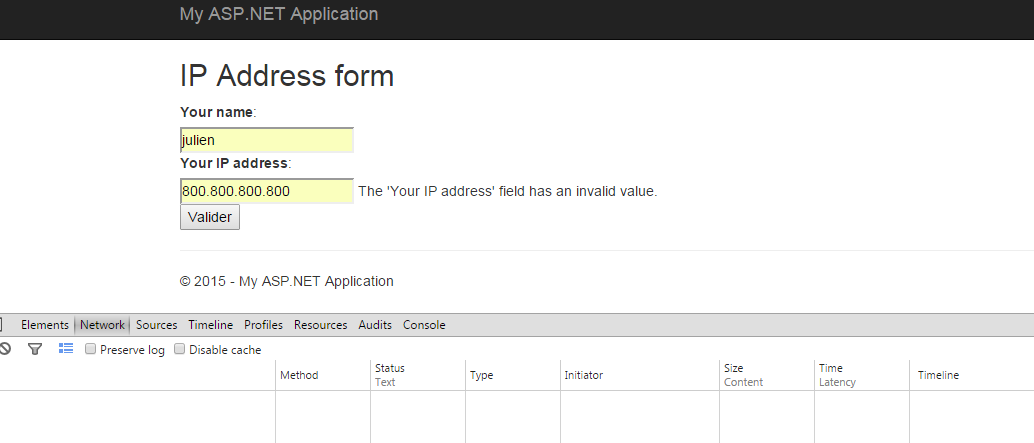
I can test the form again and see what is happening.

The data have been checked without posting them to the server. This is possible because the @Html.TextBoxFor() method has generated the following HTML for the IP address field:
<input data-val="true" data-val-required="The Your IP address field is required." id="IPAddress" name="IPAddress" type="text" value="" aria-required="true" class="input-validation-error" aria-describedby="IPAddress-error IPAddress-error" aria-invalid="true">
The data-val-* attributes (HTML5) are used by the jquery.validate plugin to perform the client-side validation. But as you can see, there is nothing related to our regular expression pattern we defined for the IPAddressAttribute. And if you try to validate the form with an invalid IP address the form will still be posted to the server. At the moment the client-site validation is not complete.
IClientValidatable
ASP .NET MVC allow us to extend the generated HTML in order to add more control over the fields in the form. For that I will make the IpAddressAttribute implementing the IClientValidatable interface.
public class IpAddressAttribute : RegularExpressionAttribute, IClientValidatable
{
    public IpAddressAttribute()
        : base(@"^([\d]{1,3}\.){3}[\d]{1,3}$")
    {}

    public override bool IsValid(object value)
    {
        // does not change
        ...
    }

    private bool IsIpAddressValid(string ipAddress)
    {
        // does not change
        ...
    }

    public override string FormatErrorMessage(string name)
    {
        return string.Format("The '{0}' field has an invalid format.", name);
    }

    public IEnumerable<ModelClientValidationRule> GetClientValidationRules(ModelMetadata metadata, ControllerContext context)
    {
        string fieldName = metadata.DisplayName;
        string errorMessage = string.Format("The '{0}' field has an invalid format.", fieldName);
        const string pattern = @"^([\d]{1,3}\.){3}[\d]{1,3}$";

        ModelClientValidationRegexRule patternRule = new ModelClientValidationRegexRule(errorMessage, pattern);
        yield return patternRule;

        ModelClientValidationRule ipRule = new ModelClientValidationRule();
        ipRule.ValidationType = "ipformat";
        ipRule.ErrorMessage = string.Format("The '{0}' field has an invalid value.", fieldName);

        yield return ipRule;
    }
}
This method adds two new validation rule for the client-side code. The first one is for the regular expression and I use the existing ModelClientValidationRegexRule class to do so. The second one is a custom ModelClientValidationRule for which I defined the type as “ipformat”. This means that the input in the form will have a data-val-ipformat attribute.
This attribute is not recognized by the jQuery validation plugin, so I created a IPFormat.js file to extend it:
$.validator.unobtrusive.adapters.addBool("ipformat");

$.validator.addMethod("ipformat", function (value, element) {
    if (!value) {
        return false;
    }
    var bytes = value.split(".");
    if (bytes.length != 4) {
        return false;
    }
    for (i in bytes) {
        var entry = bytes[i];
        if (!entry) {
            return false;
        }
        var byte = parseInt(entry);
        if (isNaN(byte) || byte < 0 || byte > 255){
            return false;
        }
    }
    return true;
});
After including this file in my _Layout.cshtm view, I can see that the generated HTML for the text box has changed.
<script src="~/Scripts/Validators/IPFormat.js"></script>
<input data-val="true" data-val-ipformat="The 'Your IP address' field has an invalid value." data-val-regex="The 'Your IP address' field has an invalid format." data-val-regex-pattern="^([\d]{1,3}\.){3}[\d]{1,3}$" data-val-required="The Your IP address field is required." id="IPAddress" name="IPAddress" type="text" value="" aria-required="true" aria-invalid="true" class="input-validation-error" aria-describedby="IPAddress-error">
I now have my attributes for the regular expression validation and for the ipformat validation. Let’s try the form once again.

Here we are, the IP address is fully checked without being sent to the server. To achieve this I only used functionalities present in the framework, such as the IValidatableObject interface, the custom validation attributes, the IClientValidatable interface and a bit of jQuery.
This is the end of this blog post about Model validation in ASP .NET MVC on both server-side and client-side. I hope this will help you and as usual do not hesitate to comment and share this.
See you next time!
 In a lot of object-oriented programming languages there is a moment where we have to deal with null pointers/references/objects. These references must be checked to avoid any exception that might end the program in an unexpected way or moment. I think that most of us have encountered this type of error at least once in our lives. Tony Hoare said that the introduction of the null reference is its “billion-dollar mistake”. Yet sometimes it is possible to avoid the use of null pointer in our application by using the Null Object Pattern.



 Coding Journeyman