As professional developers, we want to get feedback as soon as possible in order to detect any potential issues in our software. To do so we can practice Test Driven Development (TDD) to make sure that our code is fully tested. We also have a full acceptance tests suit that prevent us to have any regression regarding existing features.
Yet this might not be enough to ensure the quality of the software we build. It is likely that you work in a team with more than one pair of programmers.
Conflicts and merges
Now imagine that two pairs work on different user stories, each duo practice TDD to ensure the quality of their developments. After a day or two both teams are done, all tests are green and the acceptance tests still passed, time to commit/check-in the code to the source control.
But unfortunately both pairs updated a common part of the project, the first team will commit their changes without any issue. But the second team will have to deal with a lot of conflicts and merges before being able to save their work on the source control.
Maybe you haven’t experienced situations like this one before but if you do, you probably know the pain it can be to merge a project full of conflicts, it can take hours…
Avoid Big-Bang commit
Conflicts and manual merges occurred, there is always a time when several developers work on the same part of a project. But it is possible to ease this process in order to avoid such situation.
You need to integrate your changes often, do not wait the end of the day to commit your code. It is preferable if the commits occurred every few hours or even sooner. This way the conflicts you might have will be way easier to solve.
Whenever you want to integrate your code to the source control you have to make sure you have the latest version on your machine in order to check if all tests (acceptance ones included) pass otherwise you need to fix them before proceeding to the commit.
With modern tools at our disposal it is possible to automate the continuous integration process. You commit your changes, then the source control build the application and run all tests. If it is green, the project is deployed (most likely on a development environment) otherwise the code changes are refused and you need to fix the issues before trying again.
Extreme Programming is mainly focused on getting quick feedbacks, with unit tests for the code, acceptance tests for the business requirements. Continuous integration has the same goal of shortening this feedback loop, this practice helps a team to avoid Big-Bang commits with massive breaking changes that lead to compatibility problems, huge conflicts and painful merges sessions.
As professional developers it is likely we have to work in a team with other developers. Even if it might happen that each team member has its speciality, it is important to share the knowledge using collective ownership.
Using this practice, every member of the team is encouraged to contribute to all parts of the project, each developer is responsible for the entire product and not only a part of it.
Collective code ownership
Each programmer can modify every line of the code base in order to fix a bug or to refactor in order to make the code cleaner.
Changes do not have to be done by a senior developer, a team leader or an architect, there is no bottleneck when an update is needed. Yet, this not mean that the younger developers should not ask for advises before making the change.
If everybody can change the code, how to prevent introduction of new bugs or regression? This is a commendable concern and it should concern you, short answer: tests!
Extreme Programming (XP) promotes the creation of acceptance tests, and also Test Driven Development (TDD), then it is likely that you have an entire test suit to help you avoiding mistake when changing code.
Pair programming sessions are also very helpful to discover how the system behave in its different modules, the knowledge of the application code base is shared.
Toward a self-organized team
When the code base is shared so is the responsibility for the well-being of the project. Every developer has the ability to improve the modules composing the application, to fix the bugs, to improve the overall quality of the project. The whole team is responsible for the success of the project.
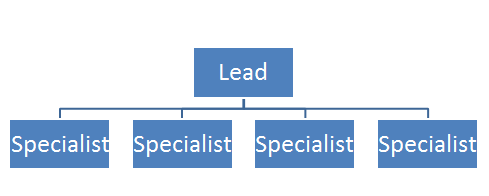
In a team with only specialists, developers only responsible for their scope, you might have an organization like the one below.
Each team member has its speciality and keep it for himself and does not interfere in the speciality of his teammates, only the lead developer might have a vision of every aspect of the projet.
Now imagine that one of the specialist leaves. Do you ask the lead to take his place since he is the only one who know what this member was working on? You can hire a new specialist to take his place but this person will to be ready for the job right away.
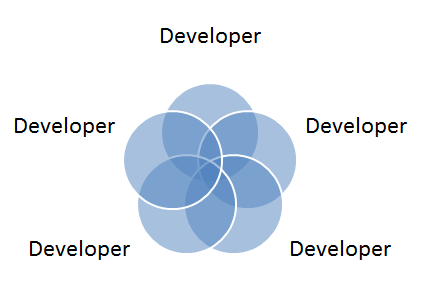
By practicing collective ownership, you can end up with an organization like the following.
The knowledge is shared among all team members and everyone is able to work on each speciality. If one of the developer leaves the project, the rest of the team is able to take care of its work while training the newcomer.
“But as a specialist, I am essential to the team and I will not be fired. In a collective ownership team I am expendable”. Well if you live in the fear of being fired and then you try to protect your scope as much as possible, you might ending up protecting you too much and falling into a blame culture environment. And I think that nobody is irreplaceable, sure your team will struggle to replace your skills but they will with time.
On the other hand, in a team where knowledge is shared, the developers works closely to each other and they build trust. In my opinion it is more likely that this team will become more and more efficient over time. And it will be silly to break this harmony by firing someone.
These two team organizations remember me of the “Notes to a software team leader” book. One looks more of a command & control type of environment and the other one more of a self-organized team environment.
Collective ownership helps a team to share knowledge, both technical and functional, between the developers. Every member is able to impact each module of the project for bug fixing, refactoring and improving the product. The team becomes a whole and is no longer a collection of individuals.
In order to practice collective code ownership it is important to also share other practices such as TDD, acceptance testing and especially pair-programming.
This week I had the chance to attend the second edition of the NCrafts conference. This conference takes place in Paris and had a lot of awesome speakers from all over Europe.
If you don’t how what this conference is about, have a look at the manifesto below, it will give you an idea.
It’s about programming but also about experience and feedback
It’s not only about technologies but also about practices
It’s not only about software craftsmanship but also about learning and exchanges for everyone
It’s not only about business and applications but mainly about people
In other words, it’s a software conference for developers by developers. We love crafting software with art, passion and technology and share it with everyone.
This manifesto reflects my philosophy and what I try to show in my blog posts. And this exactly what happened during the conference, the speakers and the attendees where very open-minded and we were able to discover new practices.
The Workshops
The day before the conference some workshops were organized by several speakers and I chose to go to the “Event Storming” workshop hosted by Alberto Brandolini and Mathias Verraes.
I will not get into the details of this workshop since I intend to write a full blog post about this experience.
To summarize, the “Event Storming” is an interactive practice that aims to bring the domain experts and the developers closer to each others. You need space on a wall, a lot of space, sticky notes and markers to use this practice.
The goal of this workout is to model the process based on domain events. At the end the developers should have a good idea of how the system should behave and what are the business rules to implement.
DDD, TDD & Functional programming
The conference lasted two days with two talks tracks for each day, there was a lot of awesome content in each talks, a lot of food for thoughts.
Domain Driven Design (DDD) was part of this conference and it makes sense since I believe that, as professional developers, we cannot produce valuable software for our clients without knowing their domain.
Functional programming had also an important place in the conference, it was almost possible to attend only functional programming talks. Most of these talks were made using the FSharp (F#) language.
I made a small introduction to this language a few months ago and being able to see F# developers from the community sharing their tips, tricks and technic was really enjoyable.
I think that functional programming will help us solve some problems we encounter in our everyday job faster than object-oriented programming. It is not better or worse, yet some paradigms of the functional approach are really attractive.
Testing had also a place in the conference for both functional programming and object-oriented programming. If you read my blog you should now know that I write quite a lot about tests, it is a topic I really care about.
During the conference I discovered new approaches for Test Driven Development (TDD) and explanation on the difficulty to practice it. The Type Driven Development (TDD again) practice for F# was really interesting in order to design software.
Waiting for NCrafts 2016
I did not attend last year edition of NCrafts but I will definitely try to go again next year. It was 3 amazing days with a lot of great and open-minded speakers. The NCrafts team did a really great job to make the experience as smooth as possible and as enjoyable as possible.
It gave me a lot of ideas to share with my team in order to improve our technical skills, practices and processes. I can only highly recommend you to watch the talks online when they will be available.
As professional developers our role is to produce high quality software for our clients. To achieve this goal we must make sure that our application meets the requirements defined by the business analysts and works as expected, without side effects.
To achieve this, you should rely on a full automated tests suite. And to make sure that this tests collection is complete and cover all your code base you can practice Test Driven Development (TDD).
TDD relies on repeating a short development cycle where tests are writing before production code. This process can be defined by the 3 following rules.
Don’t write any production code until you have written a failing unit test.
Don’t write more of a unit test than is sufficient to fail or fail to compile.
Don’t write any more production code than is sufficient to pass the failing test.
Thinking ahead
By following these rules you can implement the required needs step by step. And by writing the tests first you also have to think from a caller perspective, you are a client of your own code.
With this paradigm shift, you have to think of what is actually needed in order to complete the case you are working on and nothing more. It is helpful to avoid any unnecessary over-engineering phase that might happen in the early development phase. This way you can follow the YAGNI (You Aren’t Gonna Need It) and the KISS (Keep It Simple, Stupid) principles, you only code what you need, nothing more.
Immediate feedback
TDD makes you write your tests suite at the same time as your production code. This allows you to be able to refactor the code easily, and you will do refactoring all along the way.
Refactoring is even one of the 3 phases of TDD: Red, Green, Refactor. You start by writing a failing test (Red), you write code to make it pass (Green) and you refactor the code to make it cleaner (Refactor). And of course you make sure that the tests still passed after the refactoring before writing a new failing test.
By practicing TDD, you consistently work with a safety net, if something is broken you know it right away!
Leading to better design
The TDD approach forces you to write testable software, therefore it is likely that the code will be less coupled than if it was written straight away without tests first.
A less coupled application is easier to maintain and easier to extend with new behaviors. This way you can improve your code base by adding advanced programming patterns during refactoring phases when you actually need them.
Due to this fact, TDD is sometimes decomposed as Test Driven Design instead of Test Driven Development. Yet to achieve better design when using TDD it is important to know programming patterns and programming principles (e.g. SOLID in oriented object programming).
Living documentation
One of the benefit of having a full tests suite for your production code is that it can work as documentation for it. By browsing the tests of your APIs the caller knows how to use it, how to instantiate the classes and what the expected outputs are for the available methods.
And this kind of documentation is always up to date since it is bound to the associated code it tests, if the code is updated so are the tests otherwise it fails.
More about TDD to come
When writing these lines I am still new to TDD and to be honest I don’t practice it every time, especially when working on legacy project (which would not have become legacy if developed with TDD or proper code coverage at least…). But I strive to follow the TDD rules when adding new behaviors to an existing project covered with tests.
I really want to learn more about this practice and this is why I work on increasing my TDD skills with some side projects. I will share the experience gained from these projects in a near future on this blog.
At the moment I am convinced that using TDD is very helpful to produce high quality software in a concise way. It helps me thinking of the exact behavior I want/need for my program. I like the fact it gives instant feedback and allow constant refactoring without having the fear of breaking anything.
As professional programmers, our goal is to produce high quality software for our customers. Pair programming is a helpful technic that allow to reach this goal.
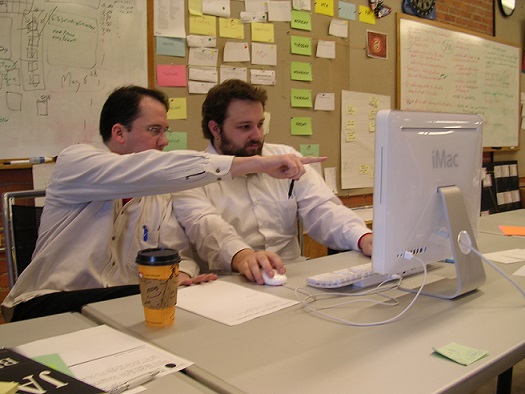
Developers do pair programming when they sit in front of the same computer to complete tasks for a new user story. To me it is a different job than pair debugging, where you work on existing code in order to fix it, in pair programming you create new functionalities for your application.
At first it can be seen as a waste of time since two team members work on the same machine and it might look that the capacity for these programmers is divided by two.
I do not share this opinion, to me pair programming is a very good way to improve efficiency when working on a new feature.
Staying focused
When you are two it is likely than there will be always one of the two developers that knows what should be done next. It is helpful when one in the pair starts to feel a bit tired, the other one can continue and you rotate regularly. This will prevent any loss of total focus during the development phase, but the pair should still do some breaks from time to time.
When one of the programmer is coding the other one looks at the written code and can detect mistakes early on, it is an effective live debugging technic.
Share knowledge
When a pair of programmers works on the same user story together they will share the knowledge of the implementation. They will both know how it has been developed, this way your team is no longer dependant on a single developer for knowledge of a specific feature.
Beside technical knowledge you can also gain a better understanding of the business knowledge related to the user story you are working on. For instance instead of having a developer working on the front office workflow (from a business perspective) and the other one on the back office one, both developers can pair-program on the two subjects to understand how the system should behave on the front side and on the back side.
The code is also written by several persons and therefore there is no code ownership, this will avoid situation like “do not touch my code!” or “I won’t touch code”. The code is owned by at least the two programmers forming the pair, a step toward egoless programming.
Share skills
Pair programming sessions are also good to learn new practices, tips and tricks. When working in pair you can simply discover a new shortcut for your favorite IDE you were not aware of.
And most of all pair programming can help you discover new skills and practice them. For example you can improve your Test Driven Development (TDD) technic when working with a pair that is more experienced than you are. During a pair-programming session, we (my teammate and I) developed an entire topic using TDD, one wrote a failing test and the other one had to make it pass and then write a failing test and so on. This was a very rewarding experience, we were both new to this yet we practiced together and improved our knowledge.
Pair-programming is a social activity, it takes time to learn and can be frustrated from time to time. Yet it is very helpful to share knowledge amongst your team, you can always learn something new from one of your peer.
This practice can seem like a waste of time but since the pair is always focused on the topic, it can go faster with a higher level of quality. You can find a study about costs and benefits of pair-programming here.
In the chapter about user stories, I explained that they should not contain every details for the feature. Yet the development team needs these details in order to provide value. The details are discussed between the whole team members and you write them down using acceptance tests.
An acceptance test represent a specific scenario for the given user story. They are written by the business analysts and the testers. The developers take no part in the writing since these tests are business focused and are not technical at all.
The acceptance tests are written during the development phase of the user story, this is mandatory since they must passed in order to validate the entire user story.
These tests must be kept and run each time a new build of the application is made. Because working on a new user story can have impacts on previous ones and you want to make sure that they are not broken. Therefore you should find a tool that allow you to run your whole acceptance tests suite automatically.
A common language
Earlier I said that the acceptance tests are written by non-technical people. This allow you to make them understandable by everyone, your whole team is able to read them.
To do so, you can use the gherkin language which has been created to answer this problematic. This language uses a Given-When-Then structure to define the steps of a scenario.
Let’s see an example with the following basic user story:
As a visitor, I want to login, in order to access the website.
I will now create two different acceptance tests with the gherkin syntax for this user story.
Given a visitor,When I log in with an existing account,Then I am able to access the website
Given a visitor,
When I log in with an undefined account,
Then I am not able to access the website
With these scenarios I get more details for the expected behavior of the application regarding the user story to develop. You can use acceptance tests to test incorrect behaviors.
One of the benefit of the gherkin language is that you can use it with several testing framework to automate your tests suite and then you can run them automatically. You can use Cucumber to do so, or Specflow with .NET, this will bring your acceptance tests to a whole new level.
Acceptance tests as proofs
Acceptance tests allow the team to prove that the user story is working as expected. You have a list of scenarios defining the behavior of the feature. And by using an automated tool, you can detect any regression quickly.
These tests are bound to the code written by the development team and therefore are up to date. If the code of the application is updated so are the tests or else it is likely they will no longer pass.
Acceptance tests as documentation
The other benefit I like about acceptance tests is the fact that they can provide documentation for the application. Every members of the team are able to read them to gain understanding of the expected behavior, very helpful for newcomers.
And since it is written by the business analysts, it uses the correct terms for the business domain. This should help the whole team to communicate by using the same vocabulary. It’s a step toward the use of an ubiquitous language for a Domain-driven design (DDD) approach.
Acceptance tests are complementary with the unit tests, they provide a good understanding of a feature and are readable by everyone. They bring the business analysts and the developers closer to each others by providing them a share ground. Using acceptance tests require a good collaboration in your whole team.
In my opinion having them is a big plus to avoid regression, like all automated tests they provide a good safety net for future developments.
In our world of digital technologies, things move fast and so do the needs of our customers. Thus, as professional software developers, we have to adapt our way of working on a project, being responsive to change is key.
For this kind of development environment, some project management models are no longer up to the task, like the Waterfall of the V-Model for example. To follow the Agile Software Development Manifesto, Extreme Programming (X.P.) is based on short development cycles.
By doing so, the development teams are able to produce new features for their products at a regular interval. The short cycles of X.P. are all about feedbacks, with them you can focus on the tasks/improvements that will provide the most value for your customers and for your company.
X.P. defines two “high-level” cycles for the development process, the iteration plan and the release plan.
The Iteration plan
An iteration is a period of time (1 to 3 weeks) during which the development team work on a set of user stories defined during an iteration planning.
The features to work on during an iteration are picked by the business analysts depending on the budget the team has. In this case the budget represent the amount of work the team can achieve for the given period.
When the next iteration is defined, the feature to produce should not change nor the priority of them. This way the developers can cut the user stories into different tasks and focus on them.
The Release plan
The user stories completed by the development teams have to be released in order to improve the products and to add value. This is defined during a release plan.
A release contains the work of several iterations, the user stories are chosen during the release planning and as the iteration planning the amount of work to achieve should not exceed the budget the teams have. The order of implementation of the user stories is defined for the release at this moment.
Once a release plan is defined the first iteration of it can be planned as well. The content of a release can change, some user stories might be cancelled, others might be introduced or the priority for some might change. Yet this should not have impact on the current iteration.
Extreme Programming like others “agile” methodologies is focused on delivering value at regular interval. To do so it requires short development cycles to allow feedbacks to happen regularly by releasing new features quickly. This is achieved by defining a release plan and several iteration plans in it.
As professional developers, our role is to write high quality code within our applications. Yet this is worthless if it does not provide any value to our customers.
There are not much companies that will hire you to let you work on whatever you want. These businesses have customers that need new features and improvements in the software they buy and use.
It most cases you will work in an industry you know nothing, or almost nothing about. But don’t worry, you will work with people who know it, the business analysts. They know how to provide value for their customers and they need talents to implement it: YOU! You form a whole team.
In order to ease the specification and especially the prioritization of development in an “agile” environment, you can rely on user stories.
User Story
A user story describes a single requirement for the system. It is expressed by the business team and it generally written as a sentence matching the following format:
As a <role>, I want <goal/desire> so that <benefit>
The details are not defined within the sentence because they are likely to change with time even if the main goal will not. Details are discussed during conversations between the business analysts and the development team.
The use of user stories allow the developers to be able to provide a low risk estimate and by extension a budget for the feature. It is focused on the user needs, specific technology details should be excluded (data base schema, algorithm, …).
The role
In the sentence describing a user story a role is defined. By doing so you are able to detect the user of the system. It is likely the person who will know all the details you need to complete the task.
If the user story needs a new User Interface (U.I.) and this person is the final user of it, you should ask him how he wants to use it. Because I think that a UI providing the goal of the user story but with a really bad User Experience (U.X.) is not as valuable as it should be.
The goal
In a user story the goal is the new feature that needs to be created. It defines what the final customer/user wants and needs. This is the part of the system that needs to be well crafted, from a code perspective and from a user experience perspective (see previous section).
The benefit
The last part of the user story describes the benefit. This way you can understand the value it provides to the customers/clients. It can also describes the final result and if you know it, you can test it!
If the benefit of a user story is hard to write down maybe it means that it is not as valuable as you think it is. And therefore there might be others user stories to prioritize first.
In an agile environment such as Extreme Programming (X.P.) the use of user stories allow the business analysts to express their needs for the customers without writing an entire documentation containing every details. They are focused on the user, the goal and the benefit. This way the development team should be able to properly estimate it and they gather the details using a good communication in the whole team.
Extreme Programming (XP) is one of the agile software development methodologies. Therefore it focuses on short development cycles and to do so it has defined several practices to follow when working with it. In this blog post I will introduce the first one: Whole Team.
As a professional developer I firmly believe in collaboration among a software development team. I believe that is by working together that we are able to create more valuable products.
The developers, the testers, the project manager and the business analysts (sometimes called “product owners”) have a common goal: product value for their customers. This is why they have to work closely with each others and they should be able to speak with each others easily, a good communication is mandatory.
Every role is important in the organization and everyone as a part to play in the project. The business analysts know what has to be done, they represent the customers needs. The developers know how it has to be done, the testers ensure that the quality standards are met and the project manager makes sure that everything runs smoothly.
I know that all of this makes sense, yet sometimes I feel like the common vision is lost in a software development team. Maybe you have experienced the well-known “programmers vs the business” work environment, or maybe the “developers vs testers”.
I know that I have experienced similar situations and I was part responsible for it. Because I only had consideration for my world, where coding is king and everything else is secondary. Now I keep in mind the “big picture”: creating value for the clients. It still requires writing well-crafted code, it is my role in the team. I have to make my teammates understand my point of view and I also have to understand their.
When working in an agile environment, in Extreme Programming for instance, you have to keep in mind that you are part of a whole team. Everyone as a role toward the creation of value.
In the career of a professional developer there is a time where we are asked not only to produce high quality software but also to become a leader for our team. And this new task requires different skills in order to be achieved, being a leader is not easy and it can definitely be frightening.
In this blog post I will not share my experience regarding this topic. Why? Simply because, when writing these lines, I am not a software team leader. And therefore I cannot give you tips for an experience I have not yet lived.
This article will be about a book that shares the experience of an actual team leader: Roy Osherove. In his book, “Notes to a Software Team Leader“, Roy explains the concept of the elastic leadership and also what are the 3 phases in which a software development team can be.
Why did I read this book?
You might wonder why I read this book about software leadership since I am not a team leader. And I asked myself the same question before reading the book. Well, maybe one day I will be asked to take the role of a leader in a software development team.
I am the kind of person who likes to plan ahead and therefore I decided to read this book about the responsibilities I might have one day. By doing so I will be able to have ideas about what will await me for this challenge.
Also, the two senior developers of my team read the book and they referred to its content. They spoke about comfort zone, commitment language and others topics. And it made me curious, so I decided to read the book to able to understand what they were talking about. And after doing it I was able to understand a bit more their situation and mine as well in the team.
In some software development teams there is no formal team leader, there are only programmers which have to work with each others in order to complete the tasks they have. And sometimes you are the most experienced developer of the team in the company and even if you did not ask for it, you are kind of the leader.
I went through short periods like these ones during my career and it can be stressful because you just don’t know how to behave when facing some situations. Reading the book can be helpful to understand in which phase you currently are and how to get out of it.
Elastic Leadership
The “ultimate” style of leadership just does not exist. If it does we would all know it by now. To be an effective leader you will have to adapt to the context you are working in, the work environment, the personalities within the team and everything that can have an impact on your team. Your leadership has to be “elastic” and you have to adapt it depending on the situation.
In “Notes to a Software Team Leader”, Roy Osherove describes 3 different kinds of leadership: command-and-control leadership, coaching leadership and facilitating leadership.
In a command-and-control mode, the team leader tries to solve everyone’s problem. This looks commendable for your team but it can also prevents your team members to learn anything since you are doing all the work.
The “coach” leader is great at teaching new things to others. He will let you experienced new things and sometimes let you do some mistakes if there are lessons to learn. This mode is helpful for your team but in some situations you can’t do it because your don’t have time for it, there are too many fires to put out.
The facilitator leader stays out-of-the-way. He makes sure that the environment is optimal for its team and relies on the skills on the team members to get things done. This type of leadership cannot be achieved if the developers are not experienced enough to face the challenges they have to deal with.
These three leadership styles can be applied to different phases that a team can encountered during the lifetime of a project.
Survival phase
Does your team spend its days on putting out fires? There is absolutely no time for learning new technologies and technics? Then you probably are in the survival mode.
Even if does not look like the kind of environment you want for your team it can be appealing to stay in it. Why? Because day after day you will do the same kind of work, the kind of work that feel “safe” because you have already done it, several times. You are in your comfort zone even if there are fires everyday.
To get out of this phase, you have to break the circle by providing slack time dedicated to learning. By gaining new skills the team members will be able to deal with more issues they have to face.
For example they can learn about refactoring technics in order to decrease the technical debt of the project. They can learn how to add unit tests to the source code.
You should not see these learning opportunities as a waste of time but as an investment in your team.
The survival phase is the time where command-and-control management can be helpful. You take control of the ship to avoid sinking and you give orders. To correct previously made bad decisions, to avoid mistakes you know will happen. Your job is to get the team out of the survival mode, to aim for the learning phase.
Learning phase
In this phase, the focus is on gaining new skills. The project is more stable than it was during survival phase and you now have time to spend on improving things.
You are no longer needed to apply a command-and-control type of management, you now need to act as a coach. Helping your coworkers to learn is your goal.
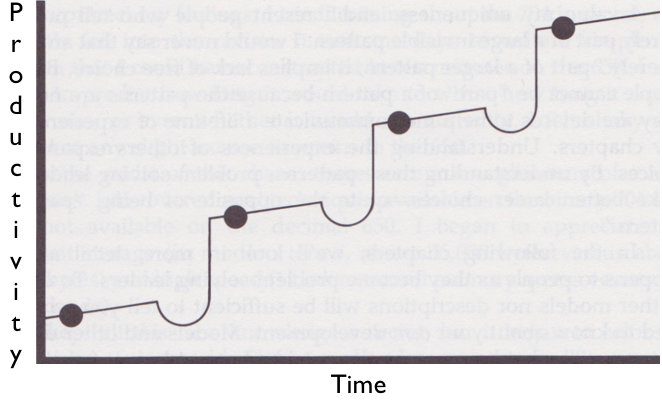
When learning you are not increasing your productivity at a constant rate, the curve is more like the one shown on the graph below.
Learning Rate With Ravines
There are ravines before each peak, they are adjustment phases and they might seem painful because your productivity is decreasing. Yet you should embrace them because they are leading you to new paradigms, skills and knowledge, you are stepping outside of your comfort zone.
The learning phase is the perfect time to teach about commitment language. When you will do something, you mean it and you will actually do it! I wrote an article about “saying yes” a while back, where it is all about commitment.
You also have to teach your team to start dealing with its own problems, the one you were dealing with during the previous phase. When a new issue is raised by a member of your team you should give them the following answer: “What will you do about it?“.
This question aims to make the members take actions in order to deal with the challenges they are facing everyday. And they of course have to answer the question using commitment language.
But what if the solution is not in our hands? Then in which hands is it? What prevents you from speaking to this person/team to explain your issue?
Even if in a lot of situations we cannot fix our problems alone, this does not mean that we are powerless. There is always an action that can be done by ourself to get closer to the “fixed” state for our issue.
During the learning phase, the team leader has to focus on the autonomy of its team to make it self-organized.
Self organization phase
When the team enters the self-organization phase, you can follow the facilitating kind of leadership. You act as a guide and remind your team the concept they learned during the learning phase, such as the commitment language.
You do not have much to do, you give your teams goals and after that you just get out of their way. They should know how to deal with the challenges they will face. They will learn the skills they need in order to get things done.
During this phase there is not much else for you to do.
Conclusion
As a software team leader, I think that your job is to strive to create self-organized teams. In a way you have to make yourself “unnecessary” by making your team autonomous. Don’t worry, this is a long and fastidious work so you won’t be unemployed just after a few months. And when you reach this goal, you can take another team stuck in the survival phase and grow the people working in it. There are a lot of software development teams that need your help!
This is just an overview of the book content and I can only encourage you to read it to learn more. I think that it is not only intended to be read by team leaders but also by every professional programmers who is interested by the phases a software development team can be in.
 As professional developers, we want to get feedback as soon as possible in order to detect any potential issues in our software. To do so we can practice Test Driven Development (TDD) to make sure that our code is fully tested. We also have a full acceptance tests suit that prevent us to have any regression regarding existing features.





 Coding Journeyman